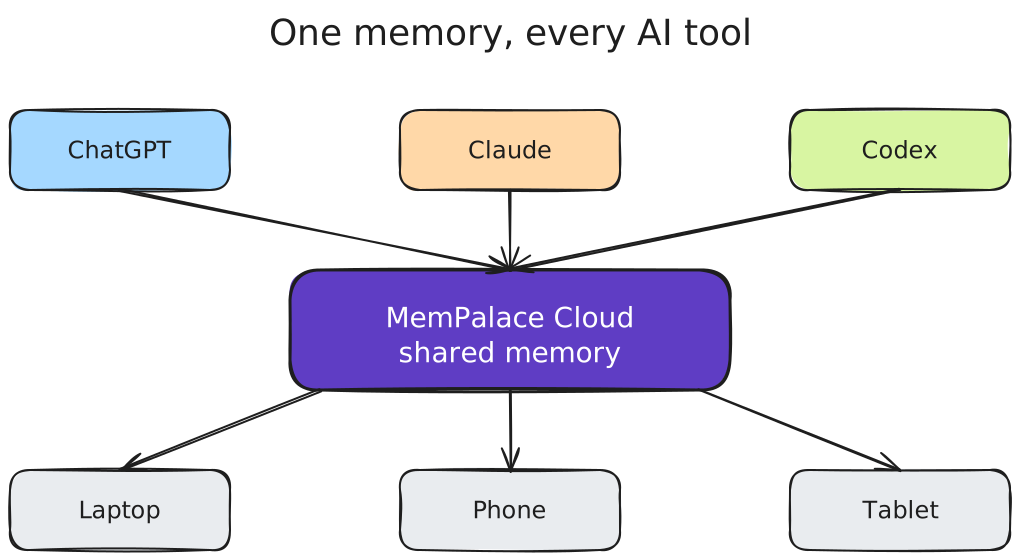
One Memory, Every AI Tool: Why I Stopped Re-Explaining Myself to ChatGPT and Claude
I built a hosted memory backend for AI tools because the same problem kept biting me every morning: my AI assistants had amnesia.
Whatever I told ChatGPT yesterday was gone today. Whatever I told Claude on my desktop never reached Claude on my phone. Whatever Codex CLI learned during a debug session evaporated the moment I quit the terminal. Three different AIs, three different black holes.
The fix is not to glue notes onto the side of a chat window. The fix is a memory layer that retrieves the right thing at the right time, across tools and devices — one place every AI you use can read and write into. This post is about why that is harder than it sounds, what changes when you have it, and where MemPalace Cloud fits compared to the alternatives.
The amnesia tax
Stop me if this sounds familiar. You have a project. You explain it to ChatGPT on Monday. By Wednesday you switch to Claude because the task needs longer context. On Friday you are in Cursor or Codex CLI for the actual code. Each one starts from zero. You re-explain. You paste old chats. You repeat yourself.
This is not a UX problem. It is a retrieval problem. The model is fine. The conversation is fine. The thing that is missing is a memory store that any AI can read and write into, that surfaces the relevant slice when a new question arrives.
People have tried to fix this with three families of tools:
- Notes apps with AI plugins — Obsidian, Notion, Logseq. You write things down. The AI reads back via a plugin. Solid for notes-first workflows.
- AI-native memory products — Mem.ai, ChatGPT's built-in memory, various "agent memory" libraries. Closer to the use case, with implementations that vary in how cross-tool they are.
- Memory infrastructure — open-source projects like MemPalace, Letta, Zep, mem0. Designed for AI consumption from day one.
All three can store text. Storage is the easy part. The hard part is retrieval that works across tools, across devices, and across enough memories to be useful past the first week.
What "AI memory" actually needs to do
Strip the marketing words and there are five things any usable AI memory layer has to handle:
- Be reachable from every AI you use. A memory that only works in one chat window is limited to one-session context. The Model Context Protocol (MCP) is the closest thing the industry has to a shared connector right now, and a memory that speaks MCP can plug into Claude Desktop, Claude Code, Codex CLI, ChatGPT custom connectors, Cursor, and Gemini CLI — wherever MCP support is available; see the per-tool setup docs for what is live today.
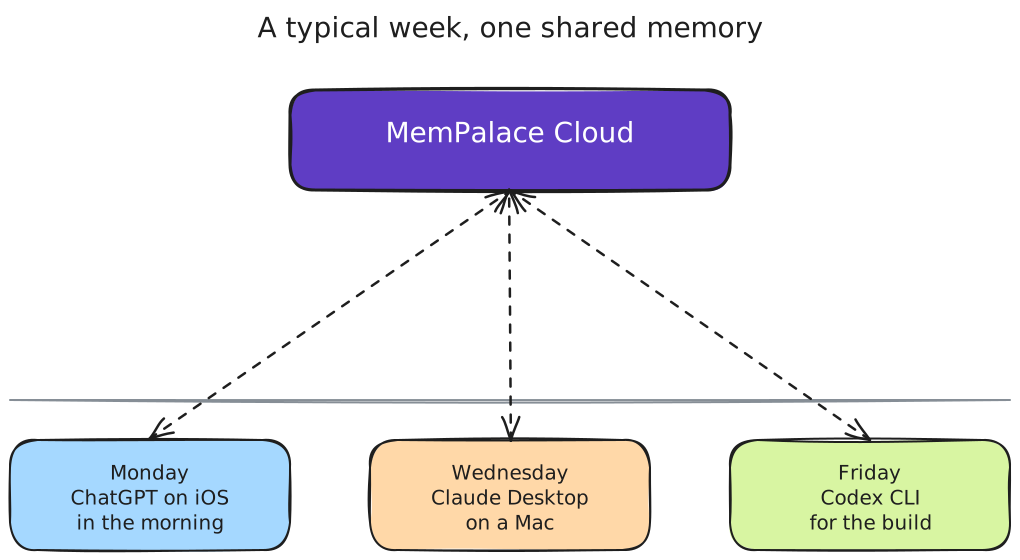
- Follow you between devices. Laptop, phone, and a second machine somewhere are the realistic baseline. If the memory only lives on one device, you will end up with the original amnesia problem on your other devices.
- Find the right thing fast. Pure keyword search misses paraphrases. Pure vector search misses exact-match cases (names, IDs, dates). A hybrid of vector + keyword is the cheap-and-effective default, with optional reranking when accuracy matters more than latency.
- Hold structure, not just text. "Project foo uses Postgres 16, decided 2026-04" is a fact, not a sentence. Storing it as a typed triple in a knowledge graph alongside the prose makes it queryable by entity instead of by phrasing.
- Pull in what you already wrote. Months of Claude Code and Codex CLI sessions on your disk contain decisions you have already made. A memory layer that does not know how to mine those is leaving the most useful data on the floor.
If a tool nails three of those, it is usable. Five and it stops feeling like a hack.
How MemPalace Cloud handles this
MemPalace Cloud is a hosted memory backend that uses the MIT-licensed MemPalace project as its retrieval engine and adds the things that only make sense as a service:
- OAuth + MCP — log in once, and any MCP-capable AI tool (Claude Desktop, Claude Code, Codex CLI, ChatGPT custom connectors) can read and write your memory. No per-machine plugin install.
- Cross-device, cross-tool by default — the memory you save from Claude on your Mac is the memory ChatGPT reads from your iPhone.
- Structured hierarchy — memories live in wings (top-level categories like projects or people), rooms (topics within a wing), and drawers (individual memories). The structure is opinionated for AI agents, not humans browsing a sidebar.
- Knowledge graph — alongside the prose memories, the engine keeps a temporal entity-relationship graph. Facts like "company X uses Postgres 16, valid from 2026-04" are queryable as triples and stay linked across wings.
- Session mining — automated import from your local Claude Code and Codex CLI session files. The AI extracts decisions and lessons; you review and approve before anything lands.
- EU hosting — data lives on EU infrastructure, operated by a German GmbH, with a published privacy policy and DPA.
The retrieval engine itself is open source. If you ever want to walk away with your data and host it yourself, the engine that runs your memory is the same one you can run on your laptop.
When you do not need a hosted memory
I want to be honest about where this is overkill or simply wrong for someone.
- You are an Obsidian power user with a 10,000-note vault. Stay there. Obsidian Sync gives you AES-256 end-to-end encrypted multi-device sync, shared vaults exist for collaboration, and the plugin ecosystem is enormous. If your workflow is write notes, sometimes ask AI to help reason over them, a hosted AI memory adds friction without removing the friction you actually have.
- You only ever talk to one AI tool, and it has built-in memory you trust. ChatGPT's memory works for ChatGPT-only users. If that is your whole stack, the cross-tool argument does not apply.
- You require local-first or air-gapped operation. The upstream MemPalace engine is MIT-licensed and runs entirely on your machine. If a hosted service is a non-starter for compliance or personal reasons, self-host it.
- You are exploring and have time to build your own stack. Mem.ai, Letta, Zep, mem0, and a handful of others all have honest products with their own trade-offs. There is no single right answer.
A memory layer is a long-term commitment. Picking the wrong one and migrating later is painful. Pick deliberately.
When a hosted AI memory pays off
The case for MemPalace Cloud is narrow and specific:
- You use more than one AI tool (some mix of Claude Desktop, Claude Code, ChatGPT, Codex CLI, Cursor, Gemini) and you want them to share memory.
- You move between multiple devices (laptop, phone, sometimes a different machine) and you want the memory to follow you without per-device setup.
- You want structured retrieval — wing/room hierarchy, hybrid search, optional knowledge graph — without running ChromaDB and SQLite yourself.
- You prefer zero plugin maintenance: one OAuth login, one MCP connection per tool, no plugin updates to chase.
If three of the four bullets describe you, hosted is the right answer. If only one does, self-hosting or sticking with what you have probably wins.
Setting it up
The fast path:
- Sign up at app.mempalace.cloud/signup.
- Pick the AI tools you use — Claude Code, ChatGPT, Claude Desktop, Codex CLI, or others.
- Follow the per-tool setup. Most are two commands or a single OAuth flow.
- Start asking your AI to remember things. Or ask it to mine recent sessions for what is worth keeping.
If you work in a team, the same retrieval engine powers Team Palaces — shared memory across colleagues, isolated per team, with role-based access. That is a separate post.
The takeaway
The amnesia problem with AI tools is a retrieval problem, not a model problem. Solving it well takes a memory layer that any of your AI tools can talk to, on any of your devices, with structure that matches how you actually work.
If a single-tool memory or a notes-app stack already covers that for you, great. If you have been pasting context into three different AI windows for months, give MemPalace Cloud a try — and if you want the numbers behind the retrieval claims, the LongMemEval benchmark post has them.
Last updated 2026-05-04.